
Motivation
For simulated space mission Operation “Silent Giant” I had to create autopilot suite.
This was an utter need, because I understood that without proper control bulky spaceplane with aerodynamics of “slightly smoothed brick” and extremely limited amount of fuel will not let us do what we planned.
So I started to work.
Simulated vehicle specifications
DeltaGlider1 is fictional spaceplane based on designs of spaceplanes developed in late 1980s – early 1990s.
Vehicle specifications:
| Empty mass: | 11.0 t |
| Max takeoff mass: | 24.9 t |
| Length: | 17.76 m |
| Wingspan: | 17.86 m |
| Aerodynamic configuration: | Blended-body tailless cropped-delta wing with winglets |
| Aerodynamic control surfaces: | Combined elevons/air brakes, rudders on winglets |
| Wing load: | 142.17 kg/m2 |
| Lift coefficient Cl (AOA = 0.2): | 0.101 |
| Main thrusters thrust: | 465.4 kN |
| Propellant: | Aerozine 50 + N2O4 |
| Take-off speed VTO: | 150 m/s (540 km/h) |
| Max speed Vmax (no boosters): | 475 m/s (1710 km/h) |
| Safe landing speed VL: | 120 m/s (432 km/h) |
| Stall speed Vstall: | 85 m/s (306 km/h) |
| Service ceiling (no boosters): | 17000 m (55000 ft) |
| Operational range (no boosters): | 79 km (42.65 nmi) |
Control system specifications
In Orbiter 2016, simulated spacecrafts can be equipped with a simulated flight computer (SFC).
Technically, this is a series of an additional calls executing during simulation runtime update.
They are (using LUA):
prestep(simt, simdt, mjd) -- executing before simulation step
poststep(simt,simdt,mjd) -- executing after simulation step
Here simt – current simulation time [s], simdt – current step length [s], mjd – current absolute simulation time in MJD format [days].
This calls emulate work of “almost hard” RTOS -update calls of RTOS not always called on equal time intervals. Time interval (simulation step length) is determined by speed of updating of simulator scene (i.e., physics simulation and mostly 3D graphics rendering). Nowadays (2025-2026), performance of modern CPUs and video cards allows to reach extremely high and stable rate of simulation updates.
SFC can be connected to “main bus” of spacecraft, which is represented by special call:
local busInterface = vessel.get_focusinterface()Through this interface you can read spacecraft state (sensor data, including speed, altitude, IMU readings, fuel mass, etc.) and pass commands to actuators (for example, to servos of aerodynamic surfaces or engine controls).
SFC has a graphical interface for interaction with operator – so called MFD, Multi-Functional Display. This is a color display (rendered in Orbiter 2016 interface or added on the panel in the cockpit of simulated spacecraft) with resolution 1024×1024 pixels, 12 multi-functional buttons with 4-symbols alphanumeric displays in them, and 3 service buttons.
MFD has refresh rate 1Hz. Update of display happens on special call:
update(skp)skp is the handle to specific “drawing context” (convention required by simulation core).
Additionally, SFC has file storage, which is transparently linked with file system of host OS (in which Orbiter 2016 is running). It can be accessed with standard file I/O functions.
SFC can be programmed using Visual C++ 6.0 or LUA 5.1.2.
In Orbiter 2016 most of applications executed on SFC are “modes” of MFD. So, following terminology of Orbiter simulator community, SFC, MFD and MFD app typically named just MFD.
Atmospheric AP
UI and functions
First application I developed for control suite for DeltaGlider was an atmospheric autopilot.
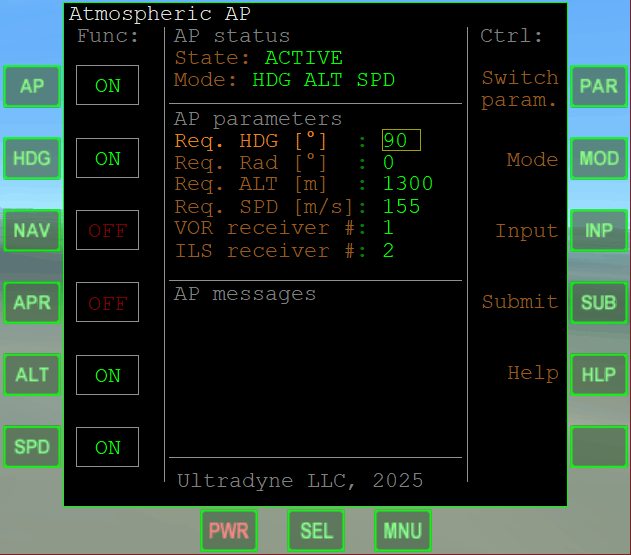
This autopilot software copies functions of classic GA autopilot, like Honeywell Bendix/King KAP 140 or similar.
Core functions of Atmospheric AP includes:
- Bank angle & vertical speed control (default mode)
- Heading control (follow given heading – HDG button)
- Altitude control (follow given altitude – ALT button)
- Airspeed control (follow given airspeed – SPD button)
- Following VOR radial (follow given radial of VOR received by given receiver – NAV button)
- Follow ILS guidance (follow guidance from ILS received by given receiver – APR button)
Programming language
As a PL for development of MFD app I chose LUA.
Orbiter 2016 is very old simulator, so an alternative for LUA was only Visual C++ 6.0 with Micro$oft compiler.
At 2025, search for M$ Visual Studo 6.0 and installation of it on Windows 10 didn’t look healthy idea. Also, at the start of the project it was not obvious, will modern Visual Studio and C++ compile modules for Orbiter 2016 correctly or no.
Later work showed that modern C++ compilers (with very special parameters) can compile at least part of Orbiter codebase. But correctness of usage of modern C++ compilers for development of Orbiter 2016 MFD add-ons is still uncertain even after finish of the project.
Same time, LUA, despite looked unusual, seemed relatively fast and could be edited literally in Notepad.
Architecture
Architecture of Atmospheric AP is presented in C4 diagram, attached to this post.
Structurally, Atmospheric AP software system consists with two main containers:
mfd(serving as an entry point, providing user input processing and displaying information)controller(providing interaction with simulated spacecraft systems and generating control)
mfd receives user input and system calls (display redraw, step update etc.), and wrap any of this calls in ProtectedCall() wrapping function, capturing and logging any errors. This allowed drastically simplify debugging process.
User input processes through special filtering functions, settings saving, and linked metatables (read – classes) generates UI for update display.
controller receives control on poststep() system call, and then:
- Receives settings from
mfd - Determine current mode
- If mode is “execute”,
controller:- evaluate current flight state
- compare it with required state
- generate control through multi-layer GNC subsystem, including layers (from high to low) of:
- navigation algorithms for VOR navigation or following ILS guidance
- PID-based algorithms for control heading or altitude
- PID-based algorithms for control vertical speed
- If mode is “standby”,
controllerreset all control values, to release the control and prepare itself for next start. - Generated control passing to PID controllers of aerodynamical surfaces and engines.
PIDs
Despite earlier I developed a software, allowed to configure PIDs using Cohen-Coon autotuning method, during development of Atmospheric AP I set all used PIDs manually, using classic Ziegler-Nichols method.
Slightly awkward, I know. But this was faster than develop mechanism allowing to tune PIDs inside autopilot in filght. I am planning to work on it in my further studies.
Limitations
Orbiter 2016 does not emulate ILS signal propagation, providing just a position of the transmitter and inbound direction for ILS.
Because of this, I had to imitate following the ILS signal using separated vector-based algorithm.
Also, Orbiter 2016 does not emulate magnetic declination (navigation systems of DeltaGlider providing “true North” without possibility to switch to “magnetic North”).
Inbound directions of ILS in Orbiter gathered from real air navigation databases, so they are given (following the air navigation rules) relative to local magnetic North (i.e., without correction for magnetic declination). Because of this, during landing by ILS Atmospheric AP can choose heading slightly different from required.
Because for landing sites I used in simulation this difference was not too big, and fix of it required lot of work, I decided to left this error unfixed.
Results
The development of Atmospheric AP was finished in about a month of work.
The app is able to control the flight of DeltaGlider at altitudes from 150 to 30000 m and at TAS from 0.17 to 3.0 M. Flight seems stable.
I am not sure how to assess stability of control generated by this autopilot mathematically. This will be a field for further studies.
- Original configuration of DeltaGlider from Orbiter 2016 distributive had issue with realism of propulsion system. This issue was fixed. Additional information about this you can find in my post about Operation “Silent Giant” simulated space mission. ↩︎